Extract receipt line items into rows
Receipt OCR
Convert Receipt to Excel Online
Convert receipt images to Excel. AI pulls date, vendor, items, and totals into a clean spreadsheet. Free trial, no sign-up.
Convert receipt to Excel without manual entry. Snap a photo of a receipt and AI extracts the vendor, date, line items, and total into a tidy spreadsheet for expenses and bookkeeping.
1 free AI conversion · 2 after email verification · 3 with Google
Drop a receipt photo here
AI reads vendor, date, line items, tax, and totals from the receipt. Supports JPG, PNG, or one PDF.
Checking available AI conversions…
Output
AI OCR tuned for receipt to excel
Each AI page is configured for a specific document structure and result. Upload first, check the preview, then export the editable output that fits the job. Guests can use the AI trial first; a free account receives welcome credits, and Pro includes 200 AI credits each month across current tools.
Capture vendor, date, tax, and totals
Download XLSX; CSV with credits or Pro; Word with Pro
Structured output
What the spreadsheet can contain
The exact fields depend on what is visible in the source, but this page is tuned to preserve the information that matters for this document type.
Merchant and receipt details
Merchant or store, receipt date, receipt number, currency, and payment method are separated from purchased items when visible.
Purchased items
Item description, quantity, unit price, and amount are treated as individual expense rows.
Adjustments and totals
Subtotal, discounts, tax, tips, fees, change, and total remain identifiable instead of being mistaken for an item.
How it works
From source file to result
Photograph or upload the receipt
Lay the receipt flat, use even light, and make sure the merchant, item list, and total are all readable in one image.
Confirm items and adjustments
Review quantities, prices, discounts, tax, tips, and totals before the receipt leaves the preview.
Export the expense data
Download XLSX to combine receipts, prepare a reimbursement report, or hand an editable file to bookkeeping.
Examples
Receipt OCR example
The source and spreadsheet preview below come from the same recorded AitoExcel conversion run.
Receipt to Excel
Coffee receipt with transaction fields
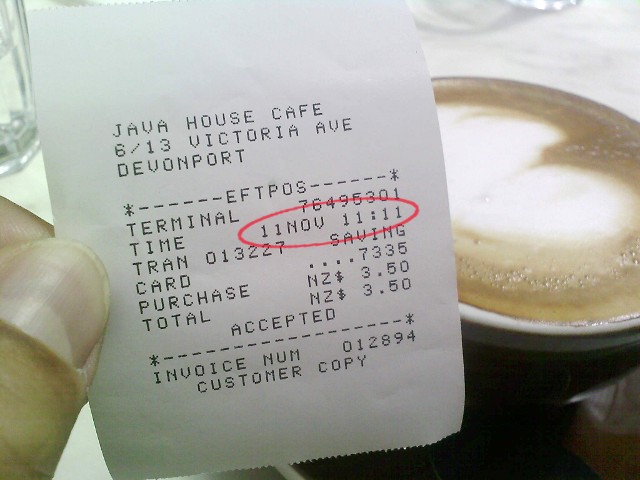
Excel output from the same run
| Field | Value |
|---|---|
| Merchant | JAVA HOUSE CAFE |
| Receipt no. | 012894 |
| Currency | NZD |
| Purchase | 3.50 |
| Total | 3.50 |
The exported workbook contains the receipt fields plus separate purchase and total rows.
Use cases
When to use this converter
Start with the real task at the top of this page: upload, preview the extracted structure, then download the output that matches the next step in your workflow.
Expense tracking
Build a spreadsheet of receipts for reimbursements and reports.
Bookkeeping
Feed receipt data straight into your accounting workflow.
Tax prep
Collect deductible purchases into one tidy sheet.
Guide
Convert Receipt to Excel Online guide
Convert receipt photos into expense rows you can review
A receipt is more than a total. For reimbursement, bookkeeping, and tax work, the merchant, date, individual purchases, tax, and payment details can all matter. This receipt to Excel converter separates the item list from subtotal, discount, tip, tax, and total lines so the spreadsheet is usable for follow-up work rather than just a copy of receipt text.
For expense reports
Use the result to check receipt dates and amounts against an expense policy or card transaction, then add categories and reimbursement notes in Excel.
For bookkeeping and tax records
The editable rows make it easier to combine purchases from multiple receipts, identify tax, and give a bookkeeper a working file instead of image attachments alone.
How to handle long, faded, or crumpled receipts
Keep the receipt flat and photograph it against a contrasting background. For a long receipt, make sure no item rows or the final total are cut off; take two overlapping photos when necessary and process them separately. Faded thermal paper, glare, or folded prices can still require a quick review, so use the preview before download.
Receipt versus invoice: choose the right converter
Receipts usually record completed purchases and point-of-sale details. Invoices usually include supplier and buyer information, due dates, tax identifiers, and billing line items. Select the receipt tool for store or restaurant receipts, and the invoice tool when you need an accounts-payable style document extracted.
Start free, no credit card required
Try it yourself — your first conversion is on us
No fake numbers, no fabricated reviews. Upload a file and see if the output works for you.
1Free AI conversion (no account)
2Credits after email verification
∞Credits never expire
Encrypted in transit & at rest
Your files are never used to train AI
GDPR & CCPA aligned
Create a free account to get 2 AI credits after email verification · 3 with Google — enough to convert several real files.
FAQ
Receipt OCR FAQ
Can it read crumpled receipts?
AI handles typical phone photos of receipts; very low-contrast or blurry images may need a clearer shot.
What file do I get?
An XLSX spreadsheet you can open anywhere. CSV is available with a credit pack or Pro, and Word is available with Pro.
Related tools
More aitoexcel tools
Each page is a focused tool. Open another one when the job calls for a different output.
Invoice OCR to Excel Online
Use invoice OCR to extract supplier details, dates, line items, taxes, and totals from an invoice image or PDF into editable Excel. Try 1 free conversion.
Open toolConvert Table Image to Excel Online
Convert a table image to Excel online. Upload a JPG, PNG, screenshot, or table photo, preview the rows and columns, then download editable XLSX. Free AI trial, no sign-up.
Open toolExtract PDF Tables to Excel Online
Extract selected PDF tables into editable Excel. Upload 1 PDF, choose the pages you need, preview rows and columns, then download XLSX.
Open toolUse AI OCR across every aitoexcel tool
Start with welcome credits, buy credits for occasional work, or choose Pro when AI conversion becomes part of your workflow.
View pricing