Select only the PDF pages that contain tables
PDF Table Extractor
Extract PDF Tables to Excel Online
Extract selected PDF tables into editable Excel. Upload 1 PDF, choose the pages you need, preview rows and columns, then download XLSX.
Use the PDF table extractor when a report, statement, or scanned document contains tables you cannot copy. Upload one PDF, select only the relevant pages, and turn the visible table structure into an editable Excel workbook.
- Input
- 1 PDF at a time
- Pages
- Choose only the pages you need
- Usage
- AI processing uses credits
- Output
- XLSX; CSV with Credits or Pro
1 free AI conversion · 2 after email verification · 3 with Google
Drop a PDF here
Choose only the pages that contain tables, then review the extracted rows before export. Supports JPG, PNG, or one PDF.
Checking available AI conversions…
No document handy?
Output
AI OCR tuned for PDF table extractor
Each AI page is configured for a specific document structure and result. Upload first, check the preview, then export the editable output that fits the job. Guests can use the AI trial first; a free account receives welcome credits, and Pro includes 200 AI credits each month across current tools.
Select only the pages you need from one PDF
Download XLSX; CSV with credits or Pro; Word with Pro
Structured output
What the spreadsheet can contain
The exact fields depend on what is visible in the source, but this page is tuned to preserve the information that matters for this document type.
Headers and table rows
Visible column names, row labels, and cell values are reconstructed into an editable spreadsheet grid.
Dates, amounts, and percentages
The extractor keeps visible number signs, decimal values, dates, currencies, and percentages available for review.
Selected-page content
Only the PDF pages you choose are processed, which keeps unrelated cover pages, terms, and disclosures out of the result.
How it works
From source file to result
Upload one PDF
Use the original PDF when possible. Batch PDF upload is not supported because one PDF can already contain multiple selected pages.
Choose the table pages
Select the page range that contains the data you need. Usage is calculated from the selected pages, not the total file length.
Review and export the table
Compare headers, rows, totals, and wrapped cells with the PDF preview, then download the editable workbook.
Examples
PDF Table Extractor example
The source and spreadsheet preview below come from the same recorded AitoExcel conversion run.
Image table to Excel
2024 Olympic medal table
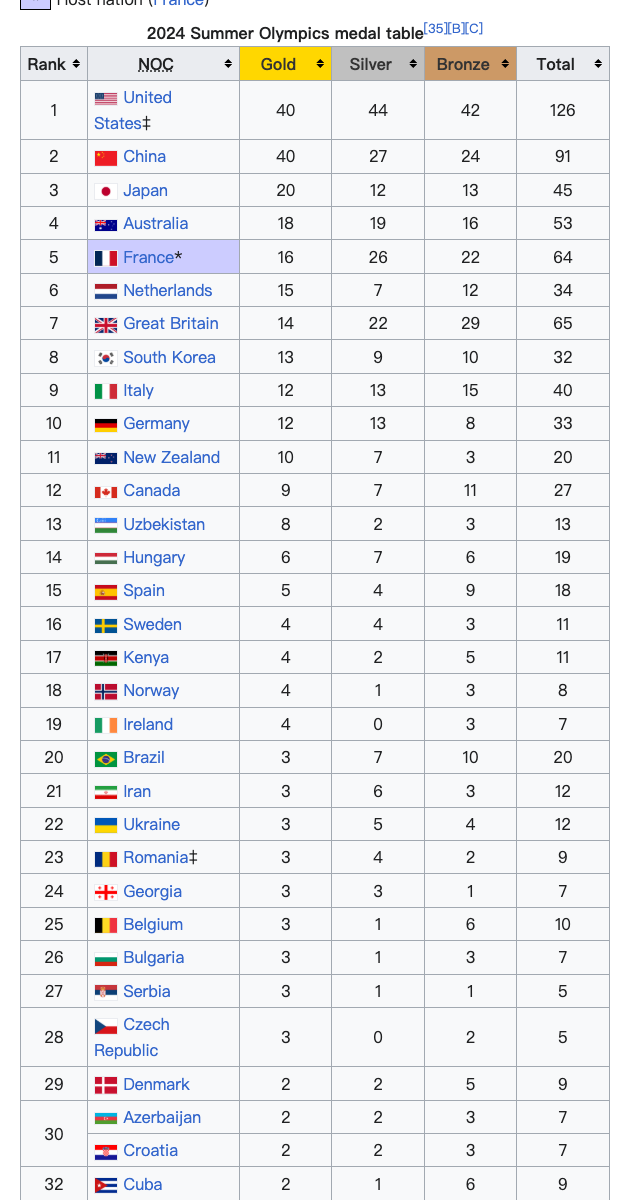
Excel output from the same run
| Rank | NOC | Gold | Silver | Total |
|---|---|---|---|---|
| 1 | United States | 40 | 44 | 126 |
| 2 | China | 40 | 27 | 91 |
| 3 | Japan | 20 | 12 | 45 |
| 4 | Australia | 18 | 19 | 53 |
32 visible rows were exported to XLSX with headers and numeric columns kept separate.
Use cases
When to use this converter
Start with the real task at the top of this page: upload, preview the extracted structure, then download the output that matches the next step in your workflow.
Financial statements
Turn a scanned annual report or filing into spreadsheet rows you can analyze.
Batched invoices
Select the invoice pages in one PDF and extract their visible line-item tables without retyping.
Reports and filings
Move tables out of reports and disclosures into clean, reusable data.
Guide
Extract PDF Tables to Excel Online guide
Extract a PDF table instead of converting the whole document
A general PDF converter tries to reproduce pages. A PDF table extractor focuses on the rows and columns you need for spreadsheet work. Select the relevant pages, inspect the detected grid, and export editable cells rather than a picture of the original page.
Reports and statements
Choose transaction, schedule, or summary pages while leaving cover sheets, narrative pages, and disclosures unprocessed.
Scanned PDF tables
When the PDF contains scanned pages instead of selectable text, OCR reads the visible table and rebuilds its structure for Excel.
Review complex PDF tables before download
Wide tables, wrapped labels, repeated headers, and merged cells can require a quick check. Compare the preview with the selected source pages and correct any OCR mistakes before using the spreadsheet for analysis or accounting.
Start free, no credit card required
Try it yourself — your first conversion is on us
No fake numbers, no fabricated reviews. Upload a file and see if the output works for you.
1Free AI conversion (no account)
2Credits after email verification
∞Credits never expire
Encrypted in transit & at rest
Your files are never used to train AI
GDPR & CCPA aligned
Create a free account to get 2 AI credits after email verification · 3 with Google — enough to convert several real files.
FAQ
PDF Table Extractor FAQ
How is PDF pricing calculated?
PDF processing uses the pages you select, not the whole file by default. Choose only the pages you need before starting.
Do you support multi-page PDFs?
Yes. Upload one PDF and choose the page range you want to process. Batch upload of multiple PDF files is not supported.
Can I extract only certain PDF pages?
Yes. Select only the pages that contain the tables you need, then process that range as one background task.
Related tools
More aitoexcel tools
Each page is a focused tool. Open another one when the job calls for a different output.
Convert Table Image to Excel Online
Convert a table image to Excel online. Upload a JPG, PNG, screenshot, or table photo, preview the rows and columns, then download editable XLSX. Free AI trial, no sign-up.
Open toolConvert Receipt to Excel Online
Convert receipt images to Excel. AI pulls date, vendor, items, and totals into a clean spreadsheet. Free trial, no sign-up.
Open toolConvert Bank Statement to Excel Online
Convert a bank statement to Excel from a PDF or image. AI extracts transaction dates, descriptions, deposits, withdrawals, and balances into editable XLSX. Free AI trial, no sign-up.
Open toolUse AI OCR across every aitoexcel tool
Start with welcome credits, buy credits for occasional work, or choose Pro when AI conversion becomes part of your workflow.
View pricing